Why Track Your Assets in Google Sheets?
What's Actually Wrong with Most Finance Apps
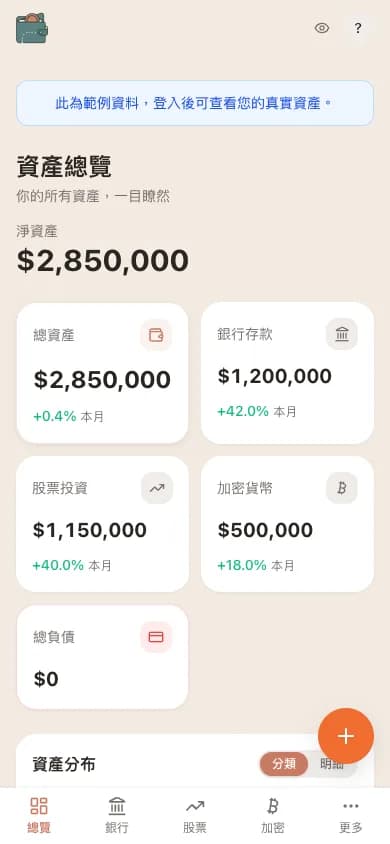 WalletMap mobile dashboard streaming live from the user's own Google Sheets
The pattern is pretty consistent: you hand over banking credentials, brokerage logins, sometimes your social security number. In return you get a slick dashboard that pulls everything together. But the convenience comes with a cost most people don't notice.
When you use a centralized finance app, your bank balances, positions, and transactions sit on someone else's servers. That's fine for plenty of people, and the reputable companies do take security seriously. But some users would rather keep that data somewhere they directly control, without depending on a third party's infrastructure.
That's why a growing number of people have circled back to a simpler, more transparent tool they already know: Google Sheets.
Google Sheets as a Financial Database

At first glance, a spreadsheet sounds like a step backward compared to a polished finance app. But look at what Google Sheets actually gives you:
- Structured storage — rows, columns, multiple tabs
- Built-in formulas for calculations, aggregation, conditional logic
- Real-time collaboration if you want to share with a partner
- Version history so you can see how net worth changed over time
- API access through the Google Sheets API for automation
- Zero cost with a Google account
Honestly, Google Sheets is a lightweight database with a visual interface. For personal finance tracking it's more than capable of handling a portfolio with hundreds of positions across multiple asset classes.
Full Ownership of Your Data
The single biggest reason to use Google Sheets is that the data is yours. It lives in your Google account, under your control. No third-party company has a copy of your net worth, your positions, or your bank balances.
That matters in a few ways.
No vendor lock-in. If you decide to switch tools, your data is already in a portable format. Export it as CSV or Excel, or hit it programmatically through the API. Try exporting your full financial history from a typical finance app — you'll usually find it's either impossible or extremely limited.
Data portability. Because your data is in a standard spreadsheet, you can plug it into anything. Want to chart it in Excel? Open the file. Want to analyze it in Python? Use the API. Want to send a summary to your accountant? Share a filtered view.
Longevity. Google Sheets has been around since 2006 and is used by billions of people. The format isn't going anywhere, which gives you confidence your data will still be accessible years from now.
The Privacy Side
When you track assets in Google Sheets, the only company with access is Google — and they already have your email, your docs, and your photos. You're not adding a brand new entity to the list of companies that know your full financial picture.
Compare it to a typical finance aggregator:
| Aspect | Finance App | Google Sheets |
|---|---|---|
| Who stores your data | App company's servers | Your Google account |
| Banking credentials shared | Often (via Plaid/Yodlee) | No |
| Additional data storage | Yes (copy on their servers) | No additional copy |
| Data portability | Varies by app | Full control (CSV, API, etc.) |
| Data export | Depends on provider | Always available |
The privacy gap is real. With Google Sheets you're not opening a new attack surface for your financial data, and you're not handing another company your credentials and a copy of your positions.
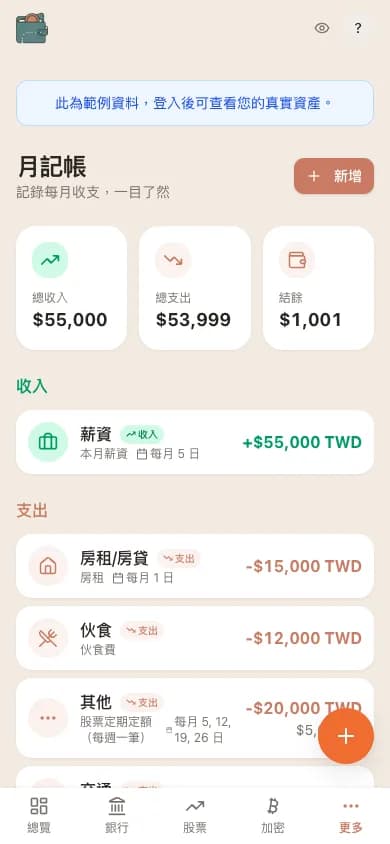 WalletMap mobile monthly budget screen
You Already Know How to Use It
One of the most underrated benefits of Google Sheets: almost everyone already knows how to use it. There's no learning curve for the basics. You already know how to:
- Add a row when you buy a new asset
- Update a cell when a balance changes
- Use SUM to total things up
- Build a chart from your data
- Share a sheet with someone you trust
That familiarity is huge. When tracking finances feels easy, you actually do it. Plenty of people download a fancy finance app, use it for a week, and quit because the interface is overwhelming or the setup takes too long.
Where Pure Manual Tracking Falls Apart
That said, doing all of this by hand in Google Sheets has real limits:
- Updates get tedious — manually punching in stock prices, crypto prices, and exchange rates gets old fast
- It's error-prone — a typo in a number can quietly mangle your whole net worth calculation
- No real-time data — your portfolio is only as current as your last manual update
- Limited visualization — building good charts and dashboards from scratch is real work
- No alerts — you won't know a position has moved until you check
Which is exactly the gap WalletMap fills.
 WalletMap mobile bank page grouped by TWD and USD
How WalletMap Handles the Manual Stuff
WalletMap takes the Google Sheets approach and removes the painful parts. It doesn't replace the spreadsheet — it adds a layer on top.
Automatic price updates. WalletMap connects to live price APIs (CoinGecko for crypto, forex services for currency rates) and writes the values straight into your sheet. You don't have to look up the current price of Bitcoin or the USD/TWD rate yourself.
Smart dashboard. Your data still lives in Google Sheets, but WalletMap gives you a visual dashboard with allocation charts, performance tracking, and net worth summaries. You get the look of a polished finance app while keeping the data ownership of a spreadsheet.
Zero-storage architecture. This one is the key design decision: WalletMap never stores your financial data on its servers. When you open the dashboard, the app reads from your Google Sheets in real time. Close the browser and there's no copy left on a third-party server.
In practice that means you get:
- Full data ownership — everything lives in your Google Sheets
- A professional interface — charts, dashboards, automated updates
- Privacy by design — no financial data sitting on external servers
- No lock-in — your data stays in your Google account, usable with any tool
Multi-asset support. Whether you're tracking multi-currency bank accounts, stocks, crypto, or real estate, WalletMap works off a structured Google Sheets format that handles all the common asset types. Each asset class has its own tab with the columns that make sense for it.
Getting Started
The setup is straightforward:
- Sign in with your Google account
- WalletMap creates a structured Google Sheet in your Drive
- Add your holdings to the appropriate tabs
- Open your dashboard with live prices already plugged in
Your Google Sheet stays fully accessible the whole time. You can open it directly, edit by hand, share it, or export it whenever you want. WalletMap just reads from it and adds the automation layer on top.
Tracking assets in Google Sheets isn't about rejecting modern tools. It's about choosing an approach that puts transparency and ownership first. If keeping your financial data somewhere you directly control matters to you, Google Sheets is a solid foundation.
And with tools like WalletMap that build on top of Google Sheets rather than replacing them, you can have the experience of a professional finance app while keeping your data exactly where it belongs — in your hands.