Multi-Asset Tracking
Bank accounts, stocks, and cryptocurrency — manage your entire portfolio from a single, unified dashboard.
Benefits of Unified Tracking
How It Works
Add bank accounts
Record your savings, checking, fixed deposit, and foreign currency accounts with their current balances.
Track stock holdings
Add your Taiwan and US stock positions. Enter the symbol, shares, and average cost — prices update automatically.
Monitor crypto positions
Track your cryptocurrency holdings across exchanges, hot wallets, and cold wallets with live CoinGecko pricing.
View your unified dashboard
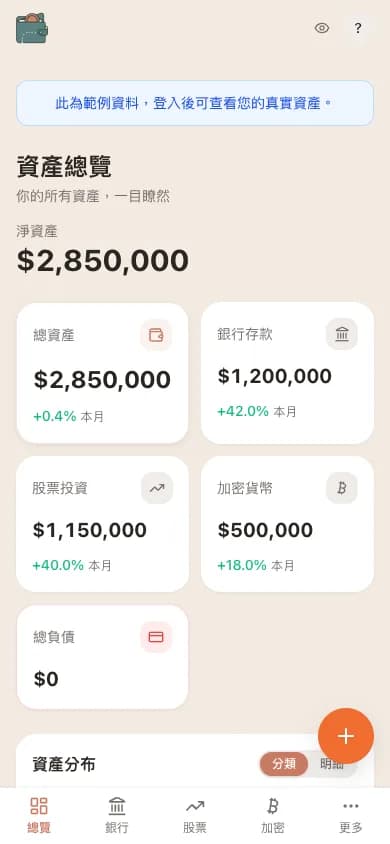
Your dashboard shows total assets, daily changes, allocation breakdowns, and performance metrics across all asset types.
Supported Asset Types
WalletMap supports bank accounts (savings, checking, fixed deposit, foreign currency), stocks (Taiwan market via Fugle, US market via Finnhub), and cryptocurrencies (thousands of coins via CoinGecko). Each asset type has its own dedicated management page with specialized fields, while the dashboard brings everything together into a cohesive overview. Transaction history spans all asset types, letting you track deposits, withdrawals, buys, sells, dividends, staking rewards, and more.
Putting bank, stocks, and crypto in one place matters more than you'd think
When most people start tracking, they spread it across apps: bank app for balance, brokerage app for stocks, exchange app for crypto. Each account looks clear in isolation, but try to answer "what do I have in total, and what's my allocation?" and you'll realize this fragmentation makes any portfolio-level decision impossible. You'll think you're balanced when one category has quietly grown past 60%.
The biggest payoff of putting every asset class in the same data model isn't "prettier UI" — it's enabling two things you couldn't do before: calculating real net worth (debt included) and seeing relative performance across categories. When you watch crypto up 15% this month, stocks up 3%, savings interest at 0.5%, you start reasoning about risk and opportunity in a way that emotion alone won't get you to.
Each asset class has its own storage shape under the hood. Stocks track ticker, share count, cost basis. Crypto tracks coin, quantity, wallet origin. Bank accounts track currency, type, balance. Crypto especially needs to distinguish "on-exchange" vs "self-custody" because counterparty risk is wildly different — they should be entered separately and only summed at the dashboard.
One thing that often gets missed: liabilities. If you have a personal loan, mortgage, or revolving credit card balance, those should weigh against your assets — but plenty of apps tuck them into a different tab. Our take is that allocation and net worth are incomplete without liabilities, otherwise the number you're reading is rosier than reality. Excel can technically do all of this, but you'll be maintaining formulas, scraping FX rates, and chasing prices yourself — three months in, most people give up. WalletMap automates that grunt work so you only have to enter numbers.
FAQ on multi-asset tracking
- Does WalletMap support Taiwan stocks? Do I need to link my brokerage?
- Yes, Taiwan stocks are supported via Fugle. No brokerage link — you enter share count and average cost manually (and trades, manually). The trade-off: you don't hand brokerage credentials or API keys to any third party, and the data stays under your control.
- How do I track real estate?
- There's no dedicated real-estate category right now. The workaround is to add it under Bank accounts with a custom name ("Primary Home") and enter your estimated value. We don't have a real estate type because valuation is so subjective (transaction price, appraisal, registry records — which one's right?), so we'd rather you decide the methodology than us hand you a falsely-precise tool.
- What about gold, foreign-currency deposits, savings insurance?
- Gold can go in as a bank account in TWD (mirroring the bank's gold passbook). Foreign-currency deposits are just a bank account in that currency. Savings insurance is trickier because the surrender value differs from future payouts — track only the current surrender value and flag it as low-liquidity rather than counting expected returns as assets.
- Excel can do all of this — why use WalletMap?
- Excel can. You'll just hit walls in three places: live quotes (GoogleFinance has no Taiwan stock support), FX updates, and cross-device viewing. WalletMap automates those layers, and the underlying data model is just a Google Sheet you own — when you want to leave, you take the sheet with you.
Explore Other Features
Ready to Take Control of Your Assets?
Start tracking your assets with complete privacy. Your data never leaves your Google Drive.
Get Started Free